01
Start with what you remember
Match part of a name or combine keywords. Filter by file type, extension or directory to narrow things down.
travel / images / shared folders
A search home for your NAS
A few letters are all you need to begin.
Find the photos, films and documents on your NAS, from your computer or phone.
Open source · Self-hosted · AGPL-3.0
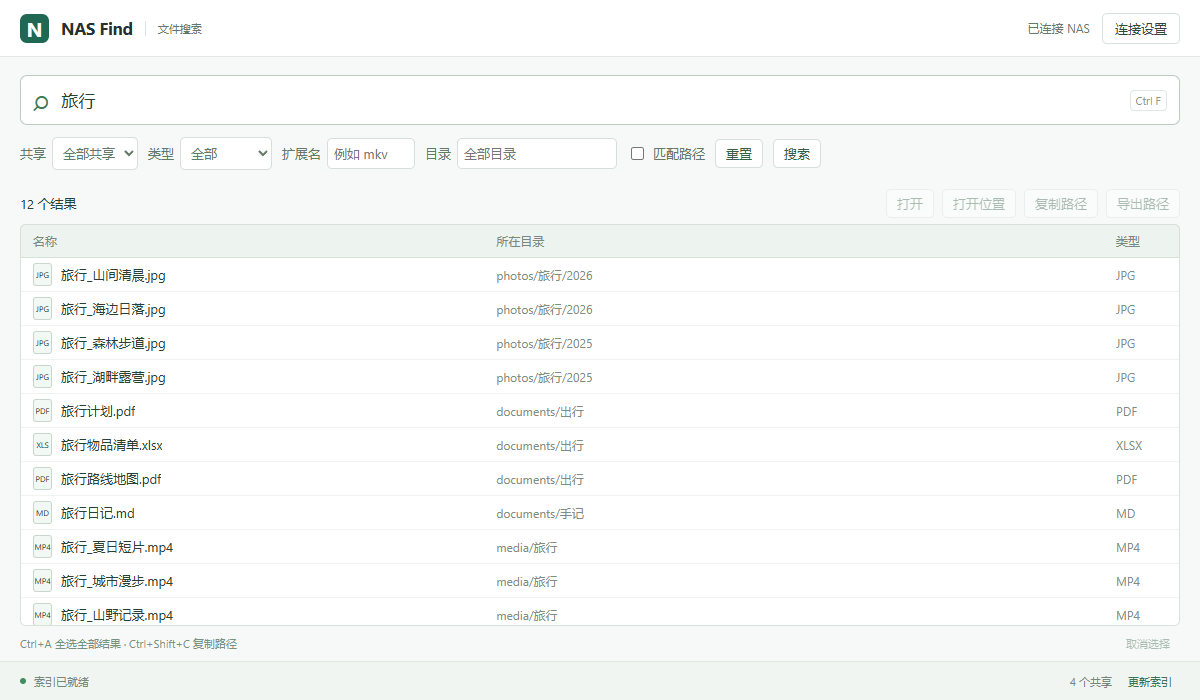
From a name to a file
Match part of a name or combine keywords. Filter by file type, extension or directory to narrow things down.
Desktop clients open the original file over SMB in your default app. Preview or download from the web and Android, too.
Select across pages or select every matching result. Copy full paths, or export a TXT or CSV file list.
The index lives on your NAS
Your NAS maintains the filename and path index. Computers and phones query the same data, without scanning the shared folders separately.
Search reads the index. Original files are accessed when you preview, download or open them. Filename changes are batched into index updates.
Read the deployment guideBack within reach
Run the service on your NAS first, then connect a client. Already set up? Download the version for your device.
Linux / NAS · Docker or native installation. Docker images are available for AMD64 and ARM64.
Set up your NAS ↗Before you get started
Everything can index network folders on Windows. NAS Find maintains the index on your NAS and shares it across Windows, Mac, Android and the web. It requires installing a service on the NAS first.
Everything · Folder indexing ↗NAS Find searches filenames and paths, with file type, extension and directory filters. Full-text content search and filtering by file size or modification date are not currently supported.
Normal searches read the index. Initial indexing, recovery checks after a restart and fallback checks every 7 days by default read the data directories. Previewing, downloading and opening files also access the original files.
NAS Find is self-hosted: indexing and search run on your NAS. Desktop clients access originals over SMB. Web downloads and Android save or share actions transfer files to your device as needed. Website analytics are separate from the NAS search service.
The service is designed for trusted local networks. For remote access, use a controlled connection such as your own VPN into the home network, and configure allowed networks as described in the deployment guide.
The service requires Linux and plocate, with Docker deployment available. An Unraid template is included; paths, permissions and filesystem notifications need checking for your NAS. Official installers support Windows x64, Apple silicon Macs and Android 8.0+. Other devices can use the web interface.
Maintained by chess99. Explore the source, supported features and release history in the repository. Found an issue? Share the steps to reproduce it.